

Opens in a new tab

Microsoft Power Pages

Build Customer Portals with Microsoft Power Pages.
Microsoft Power Pages
Take AI From Individual Tasks to Business Processes

Your Customers Shouldn't Have to Rely on Emails and Spreadsheets

When customers, partners and suppliers rely on emails, forms and manual updates to interact with your business, processes quickly become difficult to manage. Microsoft Power Pages helps you create secure, data-driven business websites that connect external users directly with your processes and information.
  • Customer Processes Are Too Manual
    Replace email chains, spreadsheets and manual requests with secure online experiences where users can interact directly with your business.
  • Information Is Hard to Access
    Give customers, partners and other external users secure access to the information and services they need without relying on your team.
  • Custom Portals Take Too Long to Build
    Use low-code development to create professional business websites and portals without starting every digital experience from scratch.
Ready to Turn Manual Interactions Into Digital Experiences?

Digital Experiences That Connect to Your Business

Build Data-Driven Websites Around Your Business

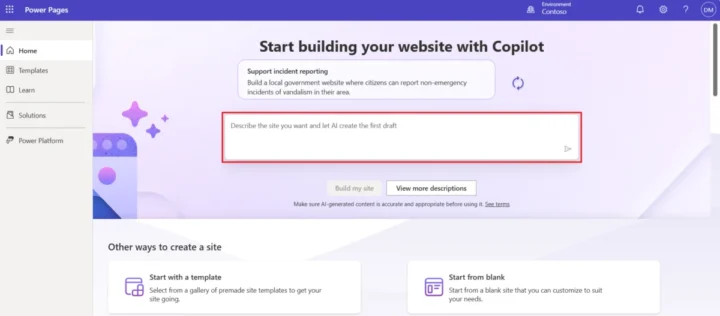
Use Microsoft Power Pages to create secure, data-driven business websites and self-service portals that connect customers, partners and other external users with the information and services they need. Build online forms, customer portals and digital processes that allow users to view, submit and interact with business data.

Connect Power Pages with Microsoft Dataverse, Dynamics 365 and Power Platform to bring website interactions into your wider business processes, creating a more connected digital experience without the complexity of traditional custom web development.
Give Customers More Ways to Help Themselves

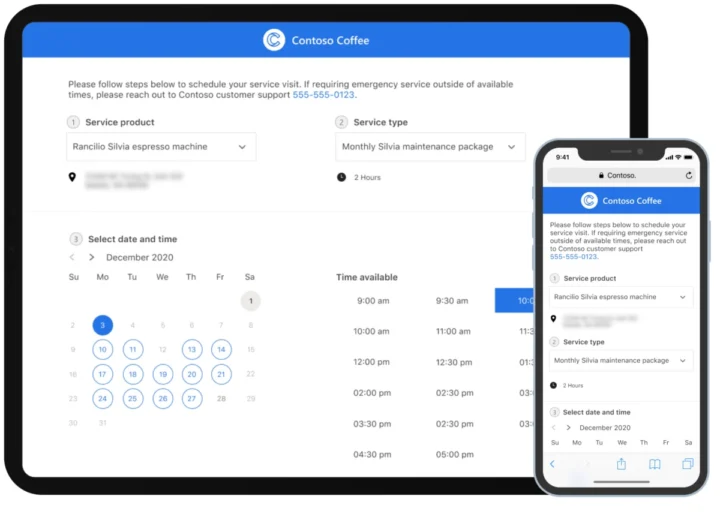
Use Microsoft Power Pages to create secure customer self-service portals that make it easier for people to access information, submit requests and interact with your business online. Customers can complete forms, provide information, view relevant data and engage with business processes without relying on employees to manually manage every interaction.

Connect Power Pages with Microsoft Dataverse and Power Platform to securely manage customer data and integrate self-service experiences with your wider business processes, helping reduce administration and deliver faster, more convenient digital services.
Connect Your Website Directly to Business Data

Use Microsoft Power Pages and Microsoft Dataverse to connect your website directly to the business data that powers your organisation. Securely display relevant information to customers, partners and other external users, while capturing online forms, requests and updates directly into Dataverse.

By connecting Power Pages with Dataverse, Dynamics 365 and the wider Microsoft Power Platform, website interactions can become part of your business processes, helping reduce duplicate data entry, improve data accuracy and create more connected digital experiences.

Connect Your Website Directly to Business Data

Turn Online Interactions Into Business Processes

Connect Microsoft Power Pages with Power Automate to turn website interactions into automated business processes. When customers or external users submit forms, make requests or update information, automated workflows can trigger approvals, notifications, task assignments and other actions without relying on manual follow-up.

By connecting your Power Pages website with workflow automation, you can move information into the right processes faster, reduce administration and create more responsive digital services that connect customers directly with your business operations.

Turn Online Interactions Into Business Processes

Give the Right Users Access to the Right Information

Use Microsoft Power Pages to create secure, authenticated experiences that give customers, partners and other external users access to the right business information and online services. Configure user permissions and web roles to control which pages, features and Microsoft Dataverse data each user can view or interact with.

Power Pages security helps protect sensitive business data while providing personalised self-service experiences, allowing your organisation to deliver useful customer and partner portals without giving users unnecessary access to confidential information.


Give the Right Users Access to the Right Information
Give Your Customers and Partners a Better Way to Work With You
Discuss Your Portal Requirements

Turn Complex External Processes Into Simple Digital Experiences

From customer self-service to partner and supplier portals, VINERGY helps you use Microsoft Power Pages to create secure digital experiences connected to your data, workflows and wider Microsoft ecosystem.
  • Customer Portals
    Create secure online experiences where customers can access relevant information, submit requests and interact with your business without relying on manual communication.
  • Partner Portals
    Give partners a dedicated digital experience for sharing information, accessing relevant resources and participating in connected business processes.
  • Supplier Portals
    Create structured online experiences that make it easier for suppliers to provide information, complete requests and interact with your organisation.
  • Self-Service Experiences
    Let external users complete common tasks themselves through intuitive online experiences, reducing repetitive administration for your internal teams.
  • Online Forms & Applications
    Replace emailed documents and disconnected forms with online processes that capture information directly into your Microsoft business environment.
  • Dataverse-Connected Websites
    Create business websites powered by Microsoft Dataverse so external experiences can securely interact with the data and processes behind your operations.

Better Ways to Interact With Your Business

Make It Easier to Do Business With You

Microsoft Power Pages gives customers, partners and suppliers a simpler way to interact with your business. Create secure customer and partner portals where users can access information, submit requests, update details, upload documents and complete common self-service tasks online, without relying on email chains, spreadsheets or manual follow-up.

By connecting your Power Pages portal with Microsoft Dataverse, Dynamics 365 and Power Automate, online interactions can flow directly into your business data and automated processes. The result is a faster, more consistent digital experience for users and less administration for your team.

Make It Easier to Do Business With You

Let Users Get More Done for Themselves

Use Microsoft Power Pages to create secure self-service portals that allow customers, partners and other external users to complete everyday tasks online. Give users a convenient place to access information, submit requests, update details, manage their account and interact with your business without relying on employees to manage every step.

By moving routine interactions into a connected digital experience, Power Pages can reduce manual administration, improve access to services and give users greater flexibility to get things done when it suits them.

Let Users Get More Done for Themselves

Reduce Manual Work Behind Every Request

Use Microsoft Power Pages to capture customer and partner requests digitally and connect information directly with your business processes. Online forms and self-service portals can collect data once, helping reduce duplicate data entry, email administration, spreadsheets and manual handovers between teams.

Connect Power Pages with Microsoft Dataverse and Power Automate to automatically route submissions, trigger notifications, assign tasks and start approval workflows. This helps reduce administration, improve data accuracy and create faster, more consistent processes from every online request.

Reduce Manual Work Behind Every Request

Connect External Experiences to Internal Processes

Use Microsoft Power Pages to connect customer, partner and supplier interactions directly with your internal business processes. Capture requests, forms and updates through secure online portals, then use Microsoft Dataverse to bring that information into a centralised data platform shared across your wider Microsoft environment.

Connect Power Automate to trigger workflows, approvals, notifications and follow-up actions automatically, helping reduce manual data entry and disconnected processes while creating a seamless flow of information between external users and internal teams.

Connect External Experiences to Internal Processes

Build Digital Services That Grow With You

Use Microsoft Power Pages to build scalable digital services that can evolve as your business, customers and processes change. Start with a focused customer or partner self-service portal, then expand with new forms, services, data and functionality as user requirements grow.

Connect Power Pages with Microsoft Dataverse, Power Automate and the wider Power Platform to create a flexible foundation for future digital experiences. Add new processes and automation over time, helping your organisation respond to changing needs without rebuilding your portal from the ground up.

Call VINERGY
Build Digital Services That Grow With You

Results from real projects.

Every organisation is different. That's why we work closely with our clients to design and implement Microsoft solutions that solve real business problems and create measurable outcomes.
CRM integrated with billing and finance processes.

Frequently asked questions.

Microsoft Power Pages delivers AI-powered business portal development with the assurance of enterprise-level security and worldwide accessibility. Low-code makers and professional developers alike have a faster and easier way to build data-centric, agentic portals to engage customers, partners, and communities, at-scale.
Got questions?
Talk to an expert
Ready to Create a Better Way to Connect With Your Business?
Talk to VINERGY